
KEI ( Keyword Effective Index ) is one of the quickest ways to find keywords that show potential -that is , those keywords which are likely to help your site attract more traffic. It looks a bit like this :
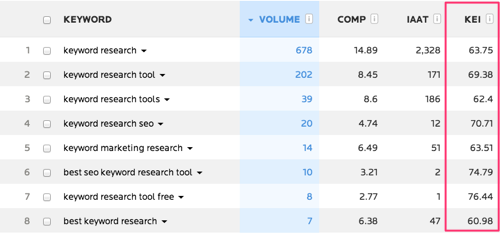
Its a scaled metri, so you'll never see a KEI of more than 100.
Its important to look at the numbers as relative value inside a niche what might be a good KEI for one niche may prove not to be so useful inside another niche. So look at the relationships between the figures in this column rather reading too much into the numbers.
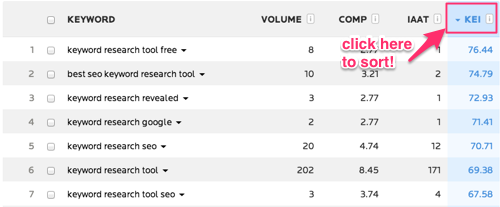
So how do we use KEI? Well, there are two ways we can find helpful figures- we're looking for high KEI as these are the keywords that show potential. The first thing to do is to sort the coloumn by KEI just by clicking the coloumn header.We can see the highest ones at the top of the list instantly, So look for the keywords that are relevant to your business. I've taken this screenshot from keyword research list.
The second way you can narrow down your list according to KEI( If you're familier with the market you're targeting and have a rough idea around search behaviour in that niche) is to use the filters on the right to exclude keywords with a KEI below a certain figure- you'll probably get more of a feel of what to exclude the more you work with a niche.
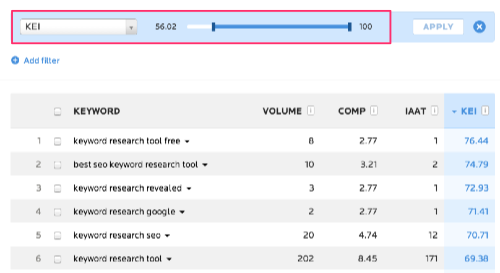
As we see in this screenshot, I've filtered the list to only show those keywords which have a higher KEI than 56. In my current list, around 1/3 of the keywords achieve this. 56 might not be the best number for you to use, particularly if you're working in a very competitive market, but as part of your keyword research, its worth looking at keywords you want to target.
#Sidbanseo
Its a scaled metri, so you'll never see a KEI of more than 100.
Its important to look at the numbers as relative value inside a niche what might be a good KEI for one niche may prove not to be so useful inside another niche. So look at the relationships between the figures in this column rather reading too much into the numbers.
So how do we use KEI? Well, there are two ways we can find helpful figures- we're looking for high KEI as these are the keywords that show potential. The first thing to do is to sort the coloumn by KEI just by clicking the coloumn header.We can see the highest ones at the top of the list instantly, So look for the keywords that are relevant to your business. I've taken this screenshot from keyword research list.
The second way you can narrow down your list according to KEI( If you're familier with the market you're targeting and have a rough idea around search behaviour in that niche) is to use the filters on the right to exclude keywords with a KEI below a certain figure- you'll probably get more of a feel of what to exclude the more you work with a niche.
As we see in this screenshot, I've filtered the list to only show those keywords which have a higher KEI than 56. In my current list, around 1/3 of the keywords achieve this. 56 might not be the best number for you to use, particularly if you're working in a very competitive market, but as part of your keyword research, its worth looking at keywords you want to target.
#Sidbanseo
Comments
Post a Comment